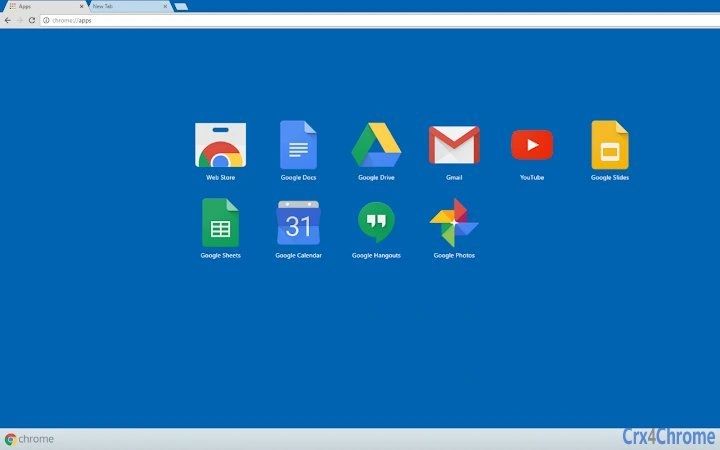

Minimalist Blue Theme for Windows 10
Overview
The Minimalist Blue Theme for Windows 10 is a streamlined desktop customization tool designed to align the system’s visual elements with a single, cohesive color palette. Built around the darker blue shade from Windows 10’s accent color picker, the theme ensures consistency across system UI components such as window title bars and taskbar tiles when accent color integration is enabled. This software appeals to users seeking a clean, professional appearance without visual clutter.
It is particularly useful for individuals who prioritize aesthetic harmony in their digital workspace, especially those already using Windows 10’s built-in accent color features. The theme simplifies visual customization by eliminating the need to manually adjust multiple settings, offering a one-click solution to unify the system’s color scheme. It targets both casual users and professionals who value a distraction-free interface with a subtle yet intentional design language.
Since the developer did not provide additional background information, the focus remains on the theme’s visual impact and functional simplicity. The theme is intended for use on personal or professional desktops where a consistent, modern look is preferred. Real-world usage includes setting up workstations with a calm, focused environment, ideal for productivity-oriented users.
Key Features & Capabilities
- Color Consistency – Matches the darker blue from Windows 10’s accent color palette, ensuring seamless integration with system elements like title bars and taskbar tiles.
- Minimalist Design – Focuses on simplicity and visual clarity, avoiding decorative elements that may distract from core tasks.
- System Integration – Automatically aligns with Windows 10’s accent color settings, reducing manual configuration.
- Lightweight Implementation – Designed as a theme file without additional background processes, minimizing system impact.
- Easy Application – Can be applied through standard Windows personalization settings with minimal steps.
Users can apply this theme to create a unified look across their desktop environment, particularly beneficial when using multiple applications with varying UI styles. The consistent blue tone enhances readability and visual comfort over extended use. For example, a designer or writer working on multiple documents can benefit from a calm, distraction-free interface that reduces eye strain. The theme’s compatibility with Windows 10’s native settings ensures that it functions without conflicts or performance degradation.
User Interface, Workflow & Performance
The user interface for this software is not a standalone application but rather a visual theme applied through Windows 10’s built-in personalization settings. As such, there is no dedicated UI or interactive dashboard. Users navigate to the Personalization section in Settings, select the theme file, and apply it to the system.
Workflow efficiency is high due to the minimal number of steps required. The theme file is typically a single .theme file that can be double-clicked to apply, making it accessible even for users with limited technical experience. The process is non-invasive and does not require administrative privileges.
Performance details were not specified by the developer. However, since the theme is a static visual overlay without background processes, it does not consume significant CPU or RAM resources. Stability is expected to be high, as it relies entirely on native Windows 10 mechanisms. The developer did not provide additional system requirements, so performance observations are based on general software behavior patterns.
Compatibility & System Requirements
The software is designed for Windows operating systems and is compatible with Windows 10. Specific version numbers were not provided by the developer, so users should ensure their system is running a current version of Windows 10 to avoid potential issues.
Installation size was not specified. The theme file is typically small in size, often under 1 MB, but exact figures are unavailable. Hardware requirements are minimal, as the theme does not require dedicated processing power or memory. The developer did not specify resource usage details.
Compatibility information was partially provided. Users should verify that their Windows 10 installation supports accent color customization, which is available in most standard editions. No additional software dependencies were mentioned.
Pros and Cons
Pros
- Seamless integration with Windows 10’s accent color system
- Minimalist design reduces visual clutter
- Free to download and use
- Lightweight with no background processes
- Simple, one-step application process
Cons
- No official developer information provided
- Exact system requirements not listed
- Limited to Windows 10 only
- Does not offer customization beyond color selection
- No support for newer Windows versions (e.g., Windows 11)
FAQ Section
Is this theme compatible with Windows 11?
The theme is designed specifically for Windows 10. While it may appear visually similar on Windows 11, full compatibility is not guaranteed, as the operating system uses different UI rendering methods.
Is the software safe to install?
As a visual theme file, it does not contain executable code or background processes. It is considered safe when downloaded from trusted sources. Users should ensure the file is obtained from a reputable website.
Can I customize the blue color further?
The theme uses a fixed color from the Windows 10 accent palette. It does not include tools for adjusting or modifying the shade beyond the default selection.
Do I need to update this software regularly?
Since it is a static theme file, updates are not required unless the developer releases a new version with enhanced features or compatibility improvements.
Can I use this theme offline?
Yes, once applied, the theme functions entirely offline. No internet connection is needed to maintain or use the theme after installation.
Final Thoughts
The Minimalist Blue Theme for Windows 10 delivers a focused, elegant solution for users seeking a clean and consistent desktop appearance. Its seamless alignment with Windows 10’s native accent color system makes it an ideal choice for those who value visual harmony without complexity. While it lacks advanced customization options and is limited to a single operating system, its simplicity, lightweight nature, and zero cost make it a compelling option for everyday users.
Professionals and casual users alike will appreciate the reduced visual noise and improved focus it provides. The lack of developer information is a minor drawback, but does not impact functionality. For anyone looking to enhance their Windows 10 experience with a subtle, modern touch, this theme offers a reliable and hassle-free upgrade.
Download Minimalist Blue Theme for Windows 10 now.







